E-Paper CMS
  • Home
  • E-Paper
  • Web Stories
Subscriber Login
Menu
HomeMemberPress
MemberPress

How To make Zapier integrations in MemberPress

admin Jun 11, 2020 1 view
How To make Zapier integrations in MemberPress
Listen to this articleReady

Do you have ever heard about Zapier integration? The automation should be easy because everyone deserves to work smarter—not harder. In this article, we explain to you how to create Zapier integrations in MemberPress.

How Zapier helps you automate?

Zaps connect your apps to automate repetitive tasks, so you can focus on other work.

More than 2000 apps are is in Zapier. Here you can integrate with any apps. In this article, we briefly explain with the screenshot you to how to integrate both Zapier & Memberpress together and what is the usage of this integrations.

By the way, MemberPress is an “all-in-one” membership plugin for WordPress that will help you build WordPress membership sites, accept credit cards securely, sell digital downloads, and more.

Step 1: Install MemberPress pro and MemberPress-developer-tools

First, you need to install the MemberPress pro plugin to implementing this integration to your WordPress website.

MemberPress and Zapier integration

Go here to know how to install a plugin in WordPress. Upon install the MemberPress pro plugin then activate it.

Next, install the memberpress-developer-tools add on.

Login to your WordPress website's dashboard and click on the MemberPress -> Add-ons page. Scroll down to the MemberPress Developer Tools add-on and install and activate it.

Now you'll have a new "Developer" option under the MemberPress Menu.
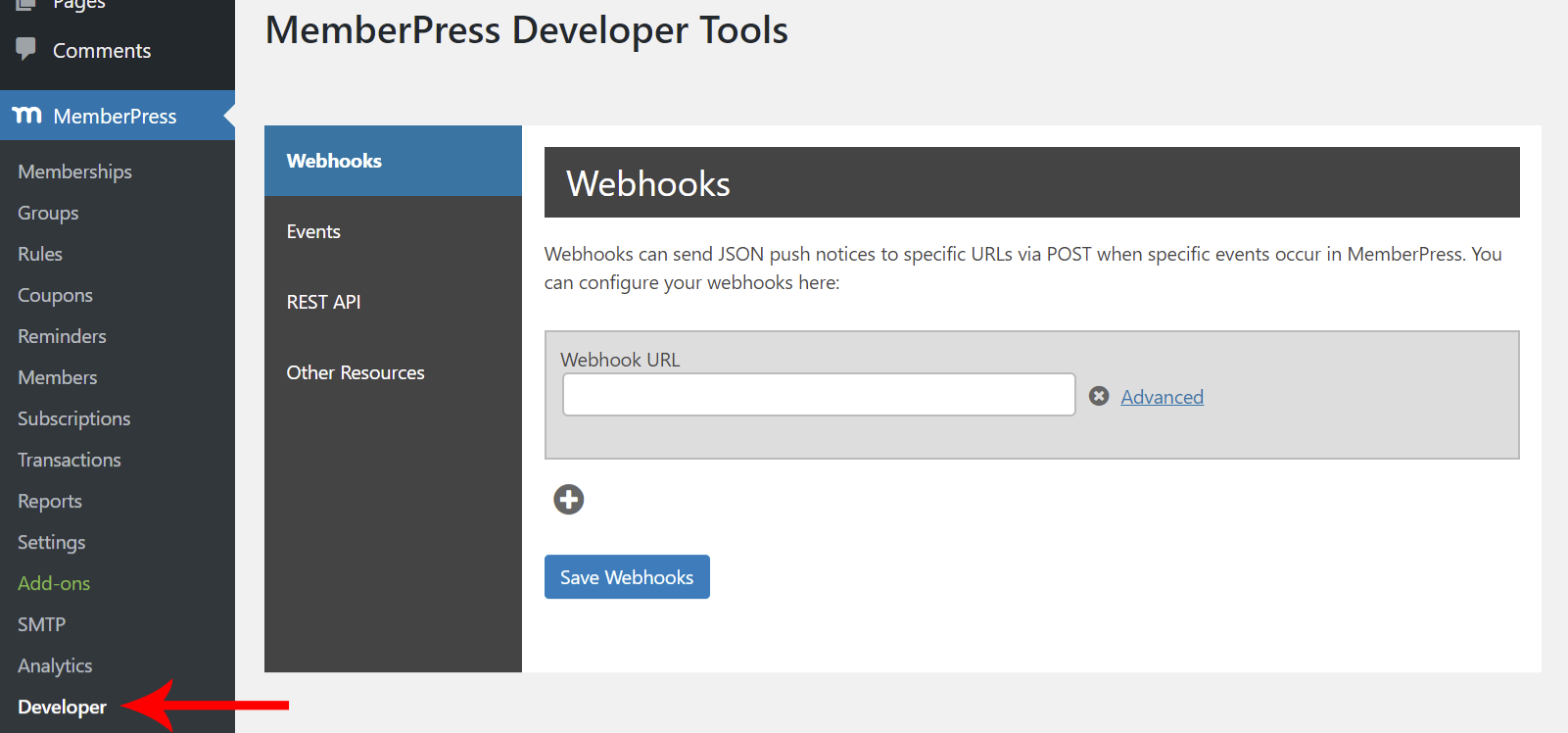
Create Zapier integrations in MemberPress

Step 2: Connect Zapier to MemberPress for Create Zapier integrations in MemberPress

Now login to your Zapier account. If have not create one here.

After logging into zapier search the "Memberpress" on the search box, or go straight to the integration. Now click on "Start using MemberPress now!"

Now it will take you to the new page. At the bottom of the new page, you will see the "Accept Invite and Build the Zap" button click on it.
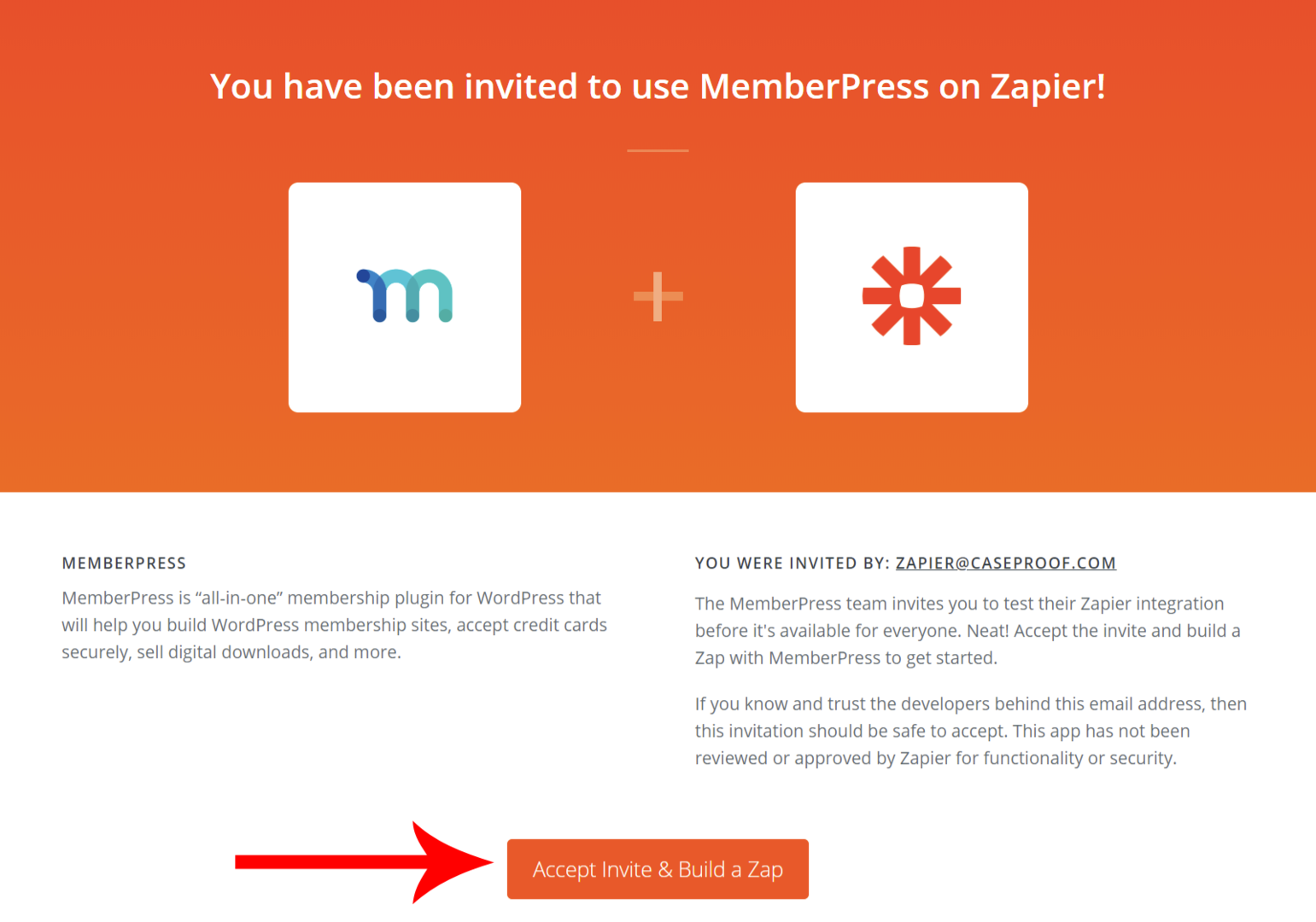
Create Zapier integrations in MemberPress

Later clicking the button your new zap stored on "My Apps" which is on the sidebar.

Create Zapier integrations in MemberPress

Here in "My Apps", you can see all your created apps. If not search the MemberPress on search box then click on it, Now a new window will then pop up asking for your API Key and Site URL.
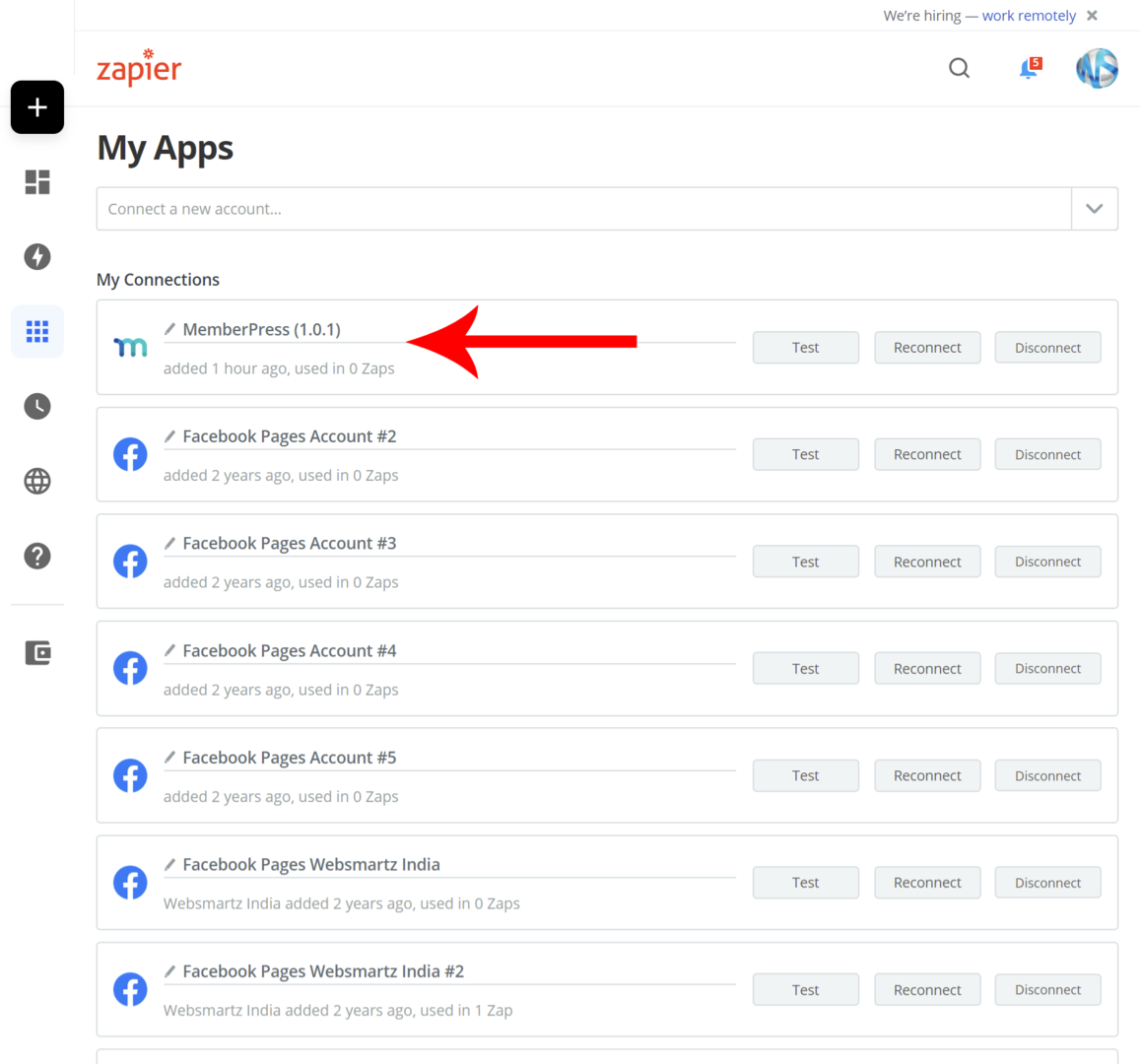
Create Zapier integrations in MemberPress

The Rest API Key is located on Developer > Rest API > API Key
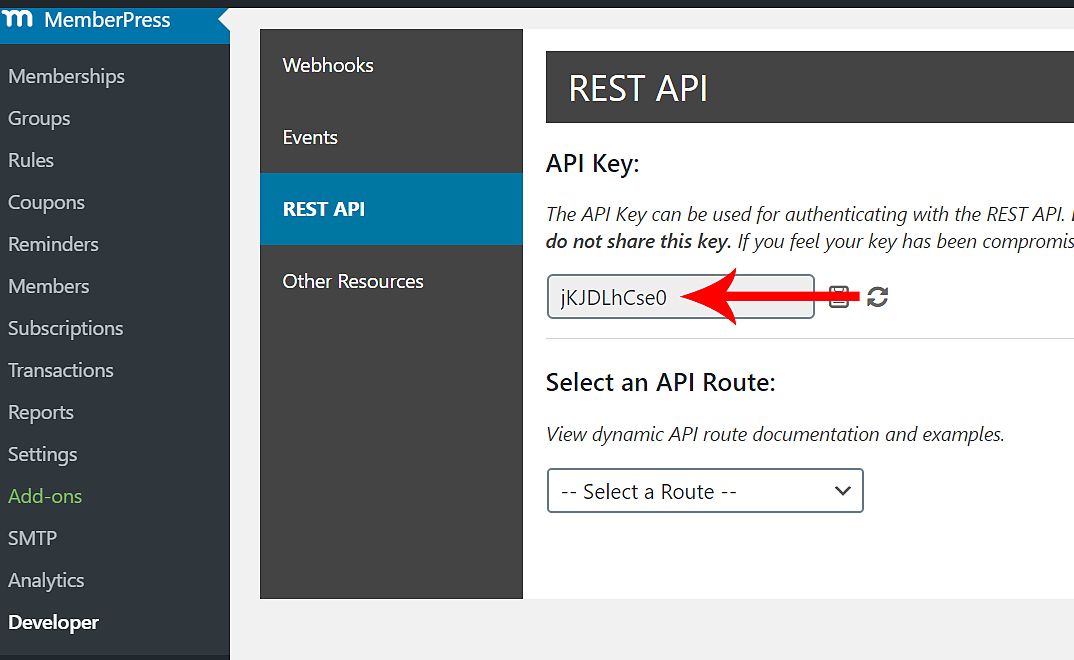
Create Zapier integrations in MemberPress

Copy the API Key and past it into the appropriate field and add the Membership website URL (Your web URL. If it is in a directory add it with the directory. (i.e: https://getnowpng.com/directory)

Create Zapier integrations in MemberPress

Then click on "Yes Continue" button.

Now one more step to spare to complete this create Zapier integrations in the MemberPress process.

Step 3: Create a Zap for Create Zapier integrations in MemberPress

Next on "Zaps" click on "Create Zap". or goes to this LINK

Create a new Zap in Zapier

Give a name to your zap (i.e.: MemberPress to google sheets) and search the MemberPress, then click on it.

Configure a MemberPress to Gmail Zap

Then you see a list of action to take, here you select "Member Signup Completed", then clicking on continue.

Choose the Member Signup Completed trigger in Zapier

Now it will be asking information about your membership website in detail.

After entering the MemberPress account, you can see all details of a particular account. now click on continue.

Next, Choose your App & Event. In this example, we are going with google sheets. Search the google sheets and click on it.

Connect Zapier and MemberPress

After the selection of Google Sheets, It will ask you to select on from dropdown. In this example, I will choose "Create Worksheet" then click continue.

Now it is requesting to login to your "Google Sheets" take proper step to complete.

Then select your "Google Sheets account" click continue. Chose "Drive", "Spreadsheet", Give a "Title", insert "Headers". after giving all values click on continue.

Now time testing your settings. Click on "TEST & CONTINUE" If your settings are correctly configured you see the "Zap is ready - now turn it on" button at the bottom of the window.
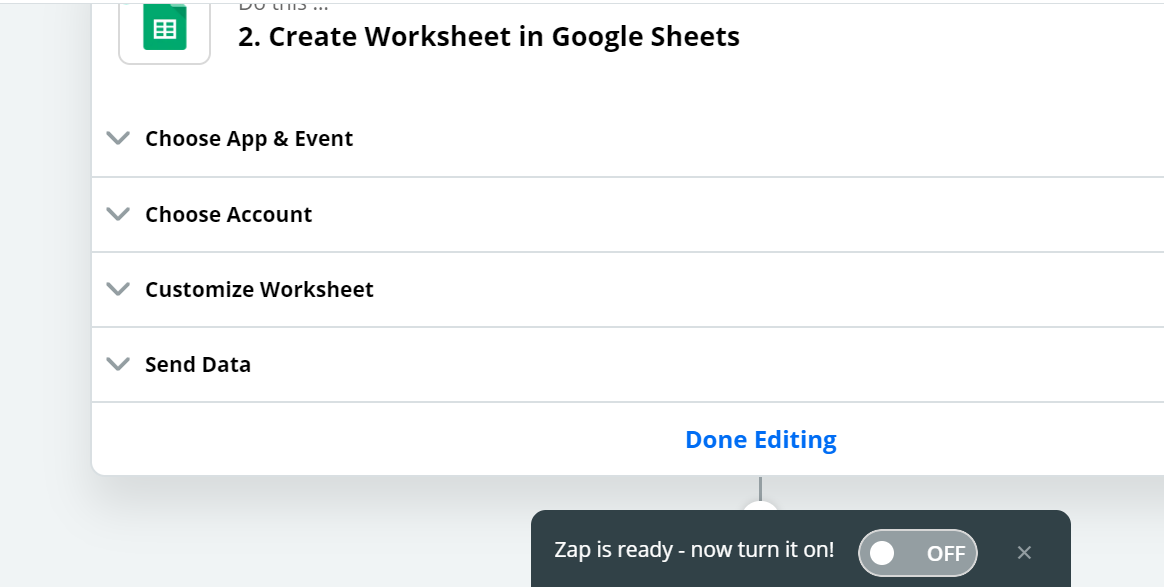
Connect Zapier and MemberPress

After turning on, come back to your website. And go to Developers > Webhooks. If you already there, refresh that page now you will see the "Webhook URL" there.
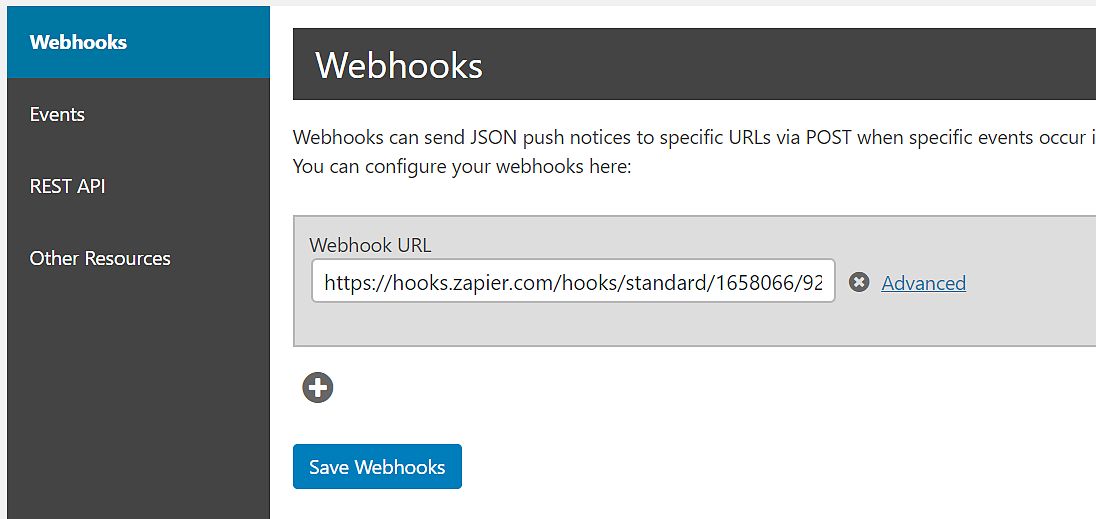
Connect Zapier and MemberPress

Now you have created the Zapier integrations in MemberPress.

Click here to add this feature to your website

Latest posts

Introducing the Power of AI-Powered GetResponse Email Newsletter:Best Email Marketing Software: A Comprehensive Comparison for Empowering Your Marketing EffortsHow to Make Sure Emails Don't Go to Spam? SMTP Using Amazon SESSend WordPress contact email with WP Mail SMTP ProTop 5 Email Marketing Service Provider for Small Business Marketers

Popular posts

01How to easily set up a Google Analytics Stats Dashboard on WordPress 10 views02How To Easily Set Up Form Conversion Tracking in WordPress (Google Analytics) 0 views03Do You Know Which Keywords People Use To Find Your Website on Google? 0 views04MonsterInsights: Track your Website by Google Analytics inside WordPress Dashboard 0 views

Cricket scores

No cricket matches are available.

Weather

Weather25°
Feels like
27°
Humidity
77%
Wind
14 km/h

Latest e-paper

E-Paper

2026-10-12

Facebook

Instagram

New edition: | 12 Oct 2026 Read now: https://200.wpwebsmartz.com/view.php?id=812 Oct 2026Discover a dedicated solution for digital newspaper management with the WPWebsmartz E-Paper CMS. This content management system is specifically designed for managing and publishing digital e-paper editions. Watch this video to explore the core capabilities of the WPWebsmartz E-Paper CMS for digital publishing and newspaper management. Learn more here: https://license.wpwebsmartz.com/epaper_standalone.php #WPWebsmartz #EPaper #EPaperCMS #DigitalPublishing #CMS #NewspaperCMS https://www.youtube.com/watch?v=vb34qg709OQ07 Oct 2026Discover the WPWebsmartz E paper CMS. Explore the dedicated system designed for managing and publishing your e-paper content online. Click the link to learn more about the features and capabilities of WPWebsmartz E paper CMS today. #WPWebsmartz #Epaper #CMS #DigitalPublishing https://license.wpwebsmartz.com/epaper_standalone.php07 Oct 2026Discover the WPWebsmartz E paper CMS. Explore the dedicated system designed for managing and publishing your e-paper content online. Click the link to learn more about the features and capabilities of WPWebsmartz E paper CMS today. #WPWebsmartz #Epaper #CMS #DigitalPublishing https://license.wpwebsmartz.com/epaper_standalone.php07 Oct 2026Are you looking for fully managed dedicated server hosting? A managed dedicated server is always required to get the best performance for your platform. Check out our full Liquid Web Managed Dedicated Server Hosting review to learn more. #LiquidWeb #DedicatedServer #WebHosting #ManagedHosting #HostingReview https://wpwebsmartz.com/liquidweb-fully-managed-dedicated-server-hosting/03 Oct 2026

YouTube

Add the YouTube URL or content URLs in Settings → Articles.

Featured posts

Top Staff Augmentation Companies in India
How Does WooCommerce Product Gallery Support Self-Hosted and Vimeo Videos?The Role of Server-Level Caching in WordPress PerformanceWhy Your Website Needs a Security Plan, Even If You Don't Handle Payments?Why Colour Choices Matter in Web Design

Horoscope

♈ಮೇಷ♉ವೃಷಭ♊ಮಿಥುನ♋ಕರ್ಕಾಟಕ♌ಸಿಂಹ♍ಕನ್ಯಾ♎ತುಲಾ♏ವೃಶ್ಚಿಕ♐ಧನು♑ಮಕರ♒ಕುಂಭ♓ಮೀನು

E-Paper clips

The latest editions do not contain hotspot clips yet.

Web Stories

8 slidesData-Safe WordPress Hosting with Built-In Backup Support 

Reader Survey

Reader Survey

Register your interest and tell us how to contact you.

Your name
Your email address
Which session will you attend?

Related Stories

How to create an Awesome Membership Site in WordPress 2021
MemberPress

How to create an Awesome Membership Site in WordPress 2021

People who are considering starting a business online. Online businesses can be run in a number of ways. It is the best idea to create a membership site at this time of pandemic crisis. There are many issues facing the world market. All of us are facing job losses and business losses. Building an online business is a g

Generate a PDF invoice on your Membership (Memberpress) website
MemberPress

Generate a PDF invoice on your Membership (Memberpress) website

Generate a PDF invoice on your Membership (Memberpress) website is not a hard process now. If you need to do create a PDF invoice on your Memberpress website. So, this article about how to make a pdf invoices in WordPress is for you. What is the actual behind the scenario? In before, take a look at what is actually thi

How-to to setup Drip content easily on your membership site
MemberPress

How-to to setup Drip content easily on your membership site

Do you have membership WordPress website? You are in the opportunity to make some money on your membership website. Yes, The MemberPress WordPress plugin gives you the drip content. From this you can easily hide your content or products from visitors to offering them to buy a membership from your website. In this artic

Latest NewsLive updates
  • Home
  • E-Paper
  • Web Stories
Logo

© 2025 E-Paper CMS. All rights reserved. | Developed by sunilubar.974@gmail.com

Epaper CMS by WPWebsmartz