How to install the Brevo to Shopify (A detailed setup guide)

Do you have an online store on Shopify? If so, this article Shopify with brevo integration is for you. Shopify is one of the large online store making platforms on the internet.
Shopify has many plugin integration facilities. So, in this article, we explain how to integrate the Shopify with brevo.
By integrating the Shopify with brevo you can make effective email and SMS campaigns. improved email deliverability as well as monitored detailed metrics to track customer activity.
Benefits of integrating the brevo with Shopify. (Key Features)
- Sync your contacts & orders ( Sync your Shopify contacts and Orders here in brevo account)
- Multichannel communication ( Send both transactional and marketing SMS from brevo account)
- Better email deliverability (You can send your transactional emails and track them to see if they have been successfully delivered, opened, clicked on, etc.)
- Tracking (web site activity, abandoned cart events)
Please keep in mind, that the Shopify to brevo integration plugin is 100% free of cost.
View Shopify account data: By integrating both brevo with Shopify, brevo will get access to your Shopify account email address, Phone Numbers, and locations.
By this integration, you can send emails and SMS to your Shopify customers by brevo .
Contact Sync: Sync your store contacts to brevo if a contact entry is added, updated, or deleted in your store, the same happens in brevo.
In addition, you can send SMS like transactional and marketing directly from the Shopify account.
Also, you can confirm that your emails don't go to spam, so that customer nothing to miss any transactional emails from you

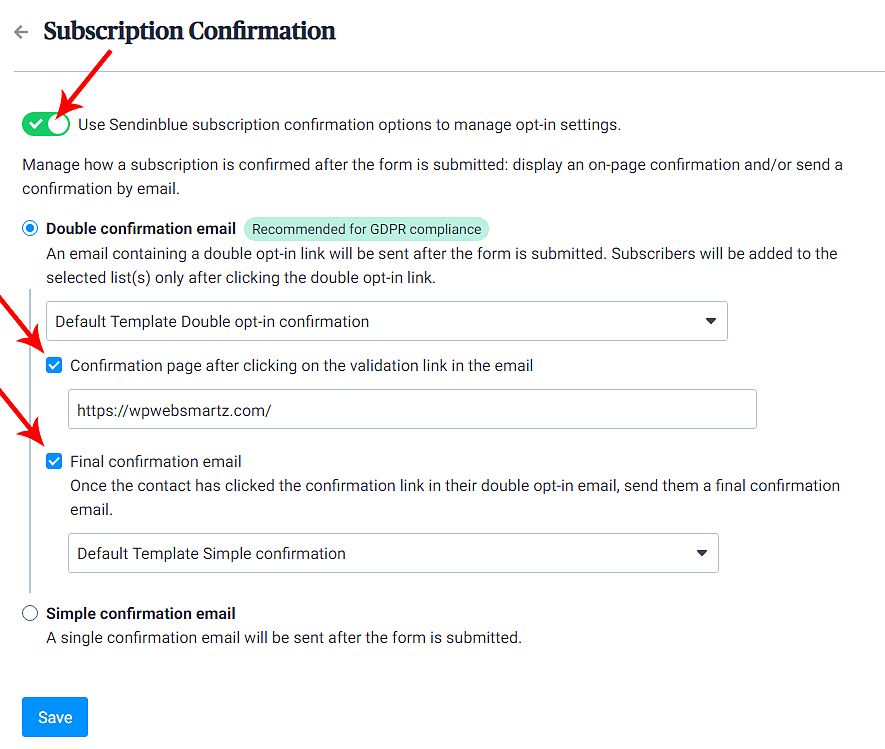
Subscription Confirmation: You can confirm that the new subscriber by double opt-in confirmation. (An email containing a double-opt-in link will be sent after the form is submitted. Subscribers will be added to the selected list(s) only after clicking the double-opt-in link)
Or, you can do it by a single opt-in confirmation email, for instance, allows you to open it and click on the confirmation button.
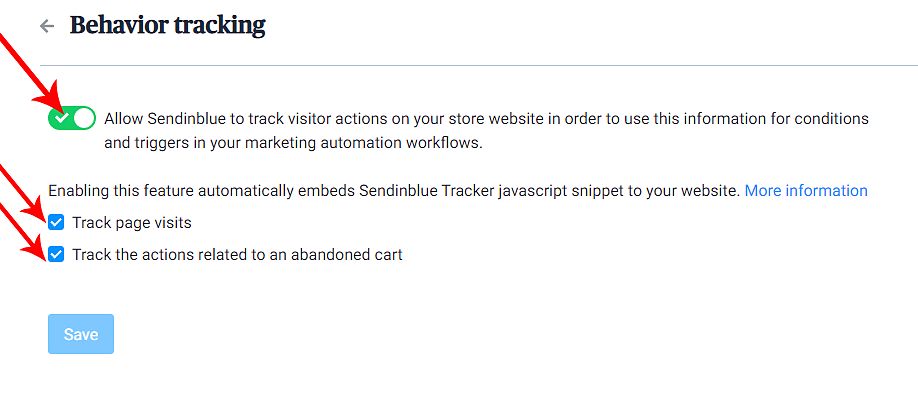
Behavior Tracking: Furthermore, you can track the user's behavior of your Shopify online store, such as Track page visits, Track the actions related to an abandoned cart.
Cart Abandonment: If someone leaves your online store by half of the way, I mean he added an item to cart but not place the order. so, by setting this up, you can send them to a reminder email.
Integration Set-Up of Shopify with brevo
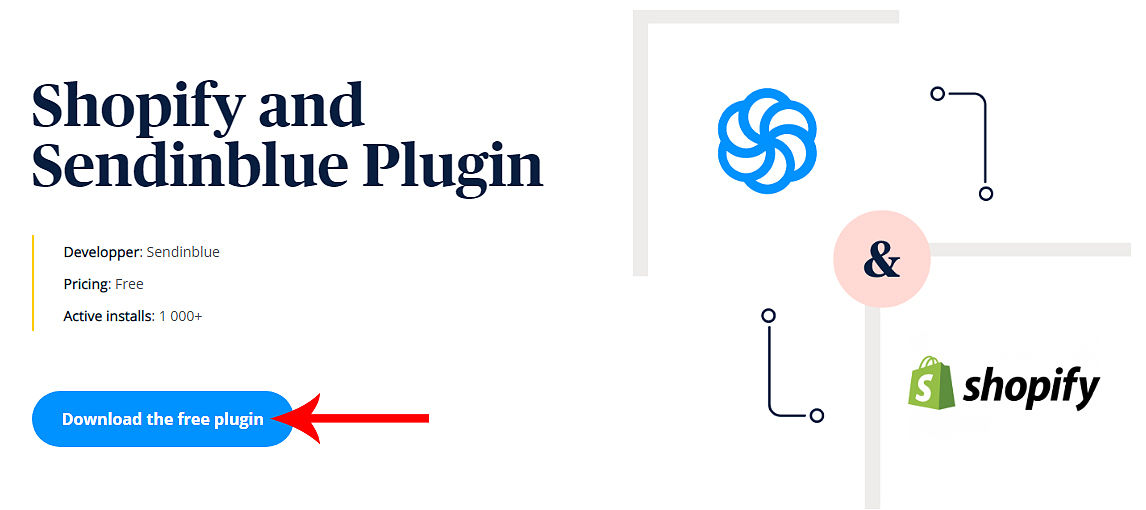
First, you need to install Shopify and brevo Plugin, you can find this on the Brevo plugin store and click on Download the free plugin. This plugin is 100% free.
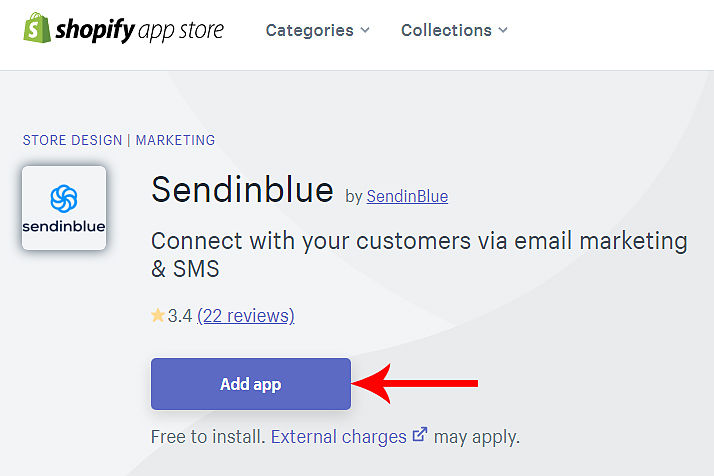
There after it will take you to the app store of Shopify. blue Add app button.
After clicking on add app it will show you a list of accessible data. such as
- View Shopify account data
- You can view products
- View orders
- Manage customers
- Manage your Online Store
- View other data
You can view it, by click on view details. So, Its better to take look on details.
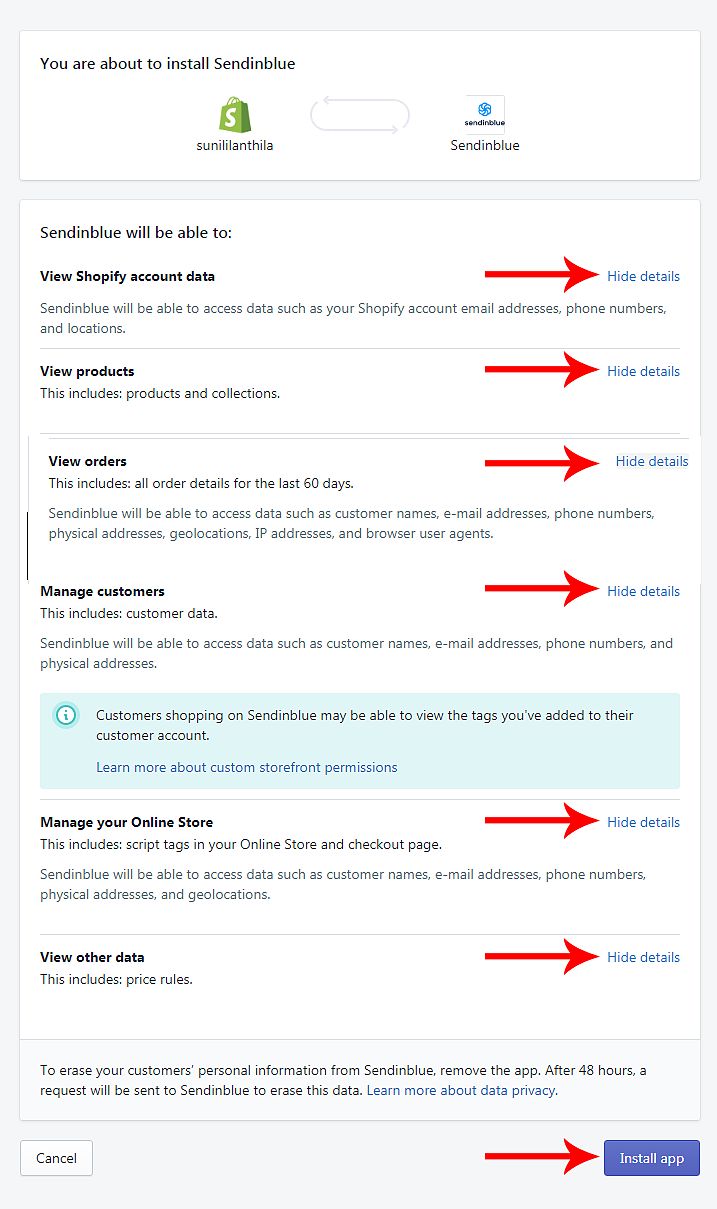
And finally, click on the "Install app".
In the next step it will be requesting access to your brevo account, so, click on "Allow access".

There after, very next window click on "Activate"

Shopify with brevo Settings
After activation, now you will be successfully connected to Shopify with brevo. Now the Shopify with brevo integration will be over successfully. Now in the next window, you will see some options to customize such as
- Contact Sync (Import your contacts and keep lists up to date)
- Subscription Confirmation (Manage your newsletter opt-in process)
- Behavior tracking (Track your visitor's actions and manage abandoned cart events)

Contact Sync of
At the beginning of Shopify with brevo integration, enable the contact sync, click on contact sync, and in the next preview enable it. And after enabling now you can see more options there to customize.
Here, under Perform sync using you can see the list name. If you want different list names" click on "ShopifySelect another list". So, it will take you to the next window. There you see a list of names. select one from there, or create a new one by clicking on "Create List".
Now add a name to your list under create list.


Map attributes
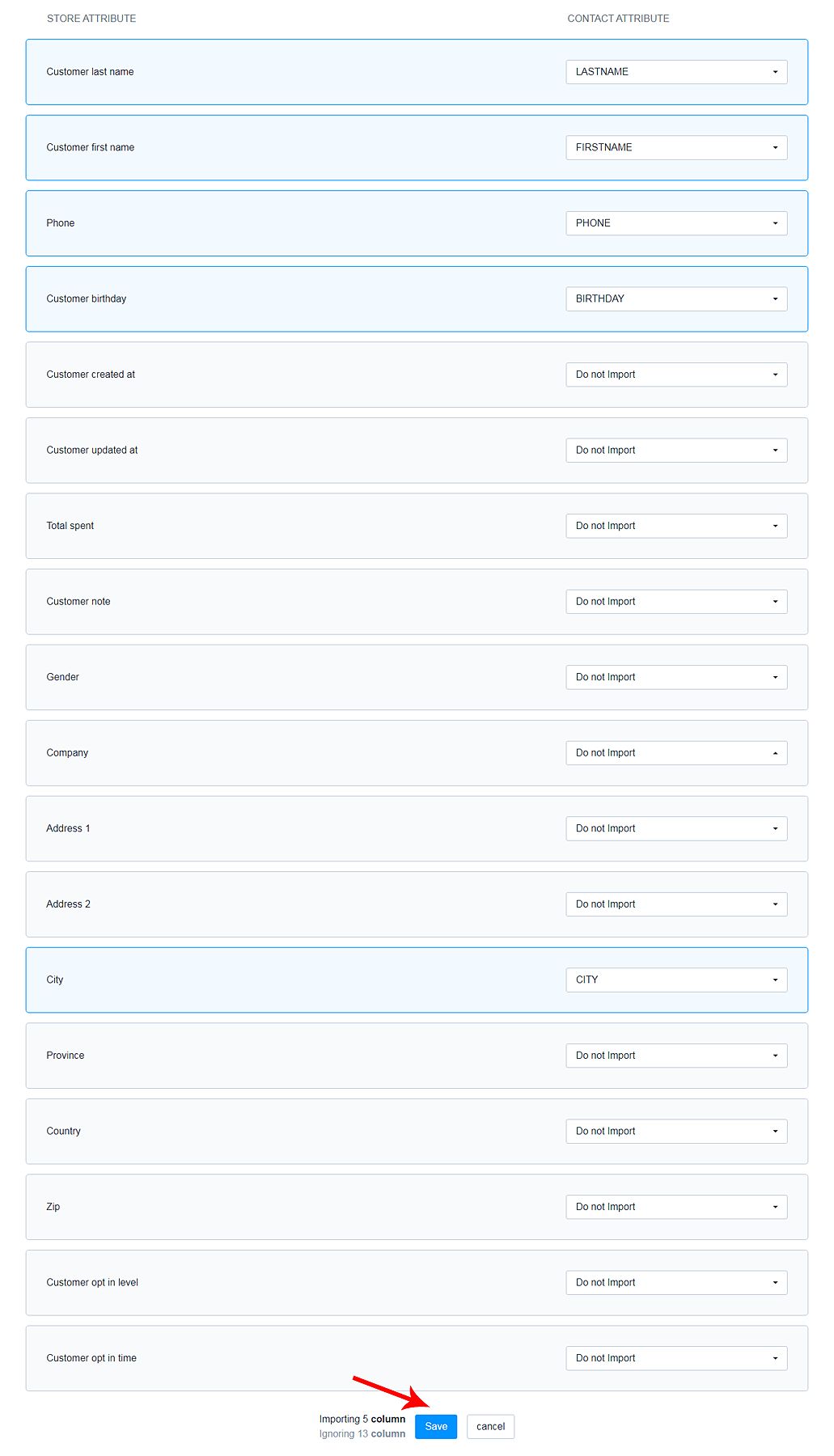
In these map attributes, you can add or remove any data from importing from Shopify, otherwise, if you don't want to sync any particular data from Shopify you can remove here in map attributes.

In addition, click on map attribution, it will take you to the page, where will be you see a list of map attributes.
So, if you want to add any particular attributes to your "CONTACT ATTRIBUTE" click on the particular "STORE ATTRIBUTE". In this tutorial, I select "City" and then click in place of "Do not Import" There you will see the "Create new attribute", click on it, then in the new window enter "Attribute name" and click Create. Now the new attribute is added to your map.


After adding attributes, save your attributes by clicking on the Save button in the window.
Setting up Subscription Confirmation
Thereafter in the Subscription Confirmation go inside this option then enable the "Double confirmation email" (When new users subscribed, they ask for confirmation with the double-opt-in link)
Enable the "Confirmation page after clicking on the validation link in the email" option. And then add the confirmation page from your website in this column, this means, when a user confirms their subscription, they will be redirected to the entered page here.
After that, enable the "Final confirmation email" checkbox. This means, when the new subscriber confirms the link, they receive a final confirmation mail.
Behavior tracking setup
Finally, in behavior tracking, click on this and enable this on the next page. By enabling this option you can track the user's behavior on your Shopify website such as "Track page visits", and "Track the actions related to an abandoned cart"( I explained this one in the section of, Benefits of integrating the brevo with Shopify. (Key Features)
Visited web pages: For example: the below screenshot is one of the user's behavior tracks. You can see every user's behavior like this. Also, you can see a list of web pages they visited.

Conclusion
In conclusion, final thoughts on Shopify with brevo integration. If you don’t have an account for brevo, you can create one now.
First of all brevo email marketing tool have a drag and drop features. So, no coding is required to create your campaigns.
Shopify brevo plugin includes tons of features you can take advantage of this plugin by installing this plugin to your Shopify e-store. And also you can utilize brevo new strategies for e-marketing.
In addition, there are lots of options to integrate this particular brevo Shopify plugin. So take time integrate to you Shopify e-store.