
Review 2019: Greengeeks vs Siteground Which one best for WordPress Hosting
Greengeeks:
GreenGeeks was founded in 2007 in Los Angeles, California USA, by Trey Gardner. ( Chief Executive Officer) the company have
- 35000+ CUSTOMERS
- 300000+ WEBSITES HOSTED
- 615000+ KWH/YEAR REPLACED
- 11 YEARS IN BUSINESS
What is Greengeeks and why it is ECO Friendly
GreenGeeks prides itself on environmentally friendly web hosting The web hosting industry using lots of energy and put big environmental damage. no waste of resources mindset. They using wind energy. Greengeeks an EPA Green Power Partner.
We mainly focused on WordPress hosting Both Greengeeks and Siteground
Greengeeks WordPress Hosting plans
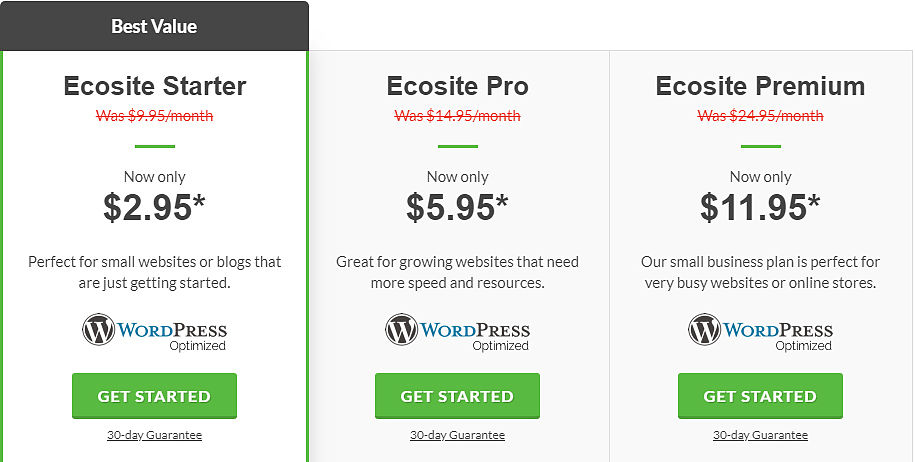
Greengeeks Wordpress hosting introducing three types pricing plans such as
Ecosite Starter | Ecosite Pro | Ecosite Premium
Ecosite Starter best suit for small business owners and newly established bloggers price which is starting from $2.95*, their pro plane starting from $11.95* this plane best suit to daily updated websites and web stores. Green geeks every plan included Unlimited SSD Disk Space Bandwidth E-mail Accounts Domain(s) Hosted. Greengeeks starting plan cheaper than Siteground
Greengeeks WordPress hosting Main features in detail
- 1 Click installer you don't need special skill to install WordPress this is just one click install, WordPress is used by 1 in 3 websites worldwide, don't know how to install WordPress then goes to this link how to install WordPress
- Auto Update Automatically updates your WordPress install to a newer version of WordPress release every time.
- Daily backing up They backup your website on a daily basis every 24 hours.
- Greengeeks offering a free SSL certificate for every plan and this will be secured your website from hackers. not only now the days Google not indexing HTTP// protocol, indexing the only HTTPS// SO this best feature ever.
- The latest technology like PHP7, SSD, CDN & more to make your WordPress blazing fast.
- Greengeeks assist you by chat, ticket or phone. for best support by 24 hours
- If you like to migrate your website from another server to greengeeks then relax greengeeks offering this by free of coast
- You buy any plan, you are eligible for a free Domain Name
Greengeeks customer reviews are in excellent and their support is at the top level. They have responded very quickly to inquiries and assist you with expert help no matter what is the issue. Greengeeks offering two types of customer support such as Live support and Phone Support

Greengeeks every plan offering you Money back Guarantee. so you do not hesitate to take chance with them and testing their service how it is. You can cancel your account for any reason and get a full refund of your hosting fees.
Greengeeks pros
- ECO-friendly web hosting– GreenGeeks implementing itself some strong values they taking and talking about the environmental impact.
- Fully Packed Features – GreenGeeks hosting plans have lots of features such as one-click WordPress install and auto-update.
- Affordable pricing value – GreenGeeks offers very competitive prices value for all web hosting plans. they are providing.
- Highly Rated Support – Greengeeks supporting you with their highly rated supporting team and they have very good support reviews
- Green Geeks 3 years plan reasonable ($106.20) than site grounds 3 years plan (
$ 142.20)
Greengeeks Cons
- Setup Fee for Monthly Billing – If you choose the month-to-month billing, there’s a $15 setup fee. The fee is waived if you pay for a year or more.
- Green geeks basic plan($59.40) Expensive than site grounds basic plan (47.40) (for one year)
SiteGround:
SiteGround was founded in 2004, and since it has grown into one of the most well known hosting companies. They also a world-class web hosting company specially crafted for WordPress, declared themselves (Officially Recommended by WordPress.org ) Their data centers in three continents.
SiteGround is one of the largest independently owned hosting companies We Siteground host more than 2,000,000 domains with this number growing by the hour.
Siteground implements free WordPress website migration toll from their C-panel. First, you need to get a transfer token from your SiteGround account. You can do this through the WordPress Migrator tool located in the WordPress section of your SiteGround hosting control panel.
Once you select the domain name that you want to initiate the transfer for, their system will generate a transfer token for you. Paste the token in your SiteGround Migrator plugin and press Initiate Transfer.
Siteground is giving you amazing customer support. and fastest hosting plans. Their WordPress optimized hosting includes everything to create a successful WordPress blog.
SiteGround WordPress Hosting plans
Siteground has three types of price plans, Startup, GrowBig and GoGeek all pans hade Essential WordPress Features. like
- FAST WordPress Launch
- FREE WordPress Transfer
- MANAGED Security & Updates
- UNMATCHED WordPress Performance

Their basic plan expensive than (StartUp $3.95/mo.) Greengeeks basic plan ($2.95*) and Sitegrounds web space is restricted. Domains restricted for one only. Greengeeks offering you unlimited web space unlimited domains for this plan with cheaper than Siteground
Siteground WordPress hosting Main features
- SiteGround to be noticeably faster and extremely reliable. All SiteGround servers are highly optimized for speed.
- Performance: Speed is always crucial for the success of a blog or Website
- Reliability: Your website available online, without facing any downtime?
- Customer Support: Their customer support is amazing they replying you with
- Tickets 24/7First Reply: 10 Minutes
- Live Chat 24/7Super Fast Pickup
- Phone 24/7Super Fast Pickup
- Application Specific Support
- The Human Side of Customer Support
- Features: Do they offer all the features and tools you will need to build your website?
- Pricing: Their pricing plans are really valued to your hard earning money
Siteground pros
- fast servers: Their server always uptime with 99.9%, their hosted website performance with blazing speed
- Top Notch Customer Support: Their customer support is an amazing, Really quick response by Ticket, Chat or Support Ticket
- Mone back Guaranty: all plans hade 30 Days Money Back Guaranty
- Free CDN and SSL They offer free CDN and free SSL certificate HTTP/2 enabled servers, Free Shopping Cart Install
- Multiple Server Locations They have data centers in three continents. You can free to choose the location will signup.
Siteground Coons
- Limited Storage: Their main setback is limited storage and only one domain in their basic plan, but Greengeeks offering you these features by unlimited
- Setup fee for monthly billing: There is a $14.95 setup fee if you choose monthly billing. But you’ll get a bigger discount and no setup fee when you buy a longer plan for one or two years so it’s a good idea to choose a longer billing period when you sign up.
Conclusions
After reviewing GreenGeeks, we decide that the green geeks are really “Most Eco-Friendly Hosting.” ( THAT'S FASTER, SCALABLE & ECO-FRIENDLY.).
Their web hosting platform is crafted to perform while being environmental. their basic WordPress hosting plan cheaper than ( Starting from $2.95/mo.) Site grounds basic plan ($3.95/mo.) and unlimited features like disk space, add domains, etc. but you will be restricted by site grounds in their basic plan. Then you will be going to buy a greengeeks WordPress hosting to run and grow a successful website or blog in our opinion.
All you have to do is click on this link to purchase.