E-Paper CMS
  • Home
  • E-Paper
  • Web Stories
Subscriber Login
Menu
HomeGoogle Analytics
Google Analytics

How to easily set up a Google Analytics Stats Dashboard on WordPress
admin Oct 10, 2019 11 views
How to easily set up a Google Analytics Stats Dashboard on WordPress
Listen to this articleReady

Do you use google analytics for your WordPress blog? Yes, indeed you should use that google analytics for your blog stats.

Here are some basic FAQs

1. What is Google Analytics Stats

Google Analytics Stats is a form of analyzing of your blogs stats. Which means it shows you how many pages views you have.

2. Is Google Analytics must required?

Yes, Definitely Google Analytics must required one to analyze the your websites stats and take appropriate actions.

3. Any alternate to Google Analytics?

Till today there is no alternate for Google Analytics

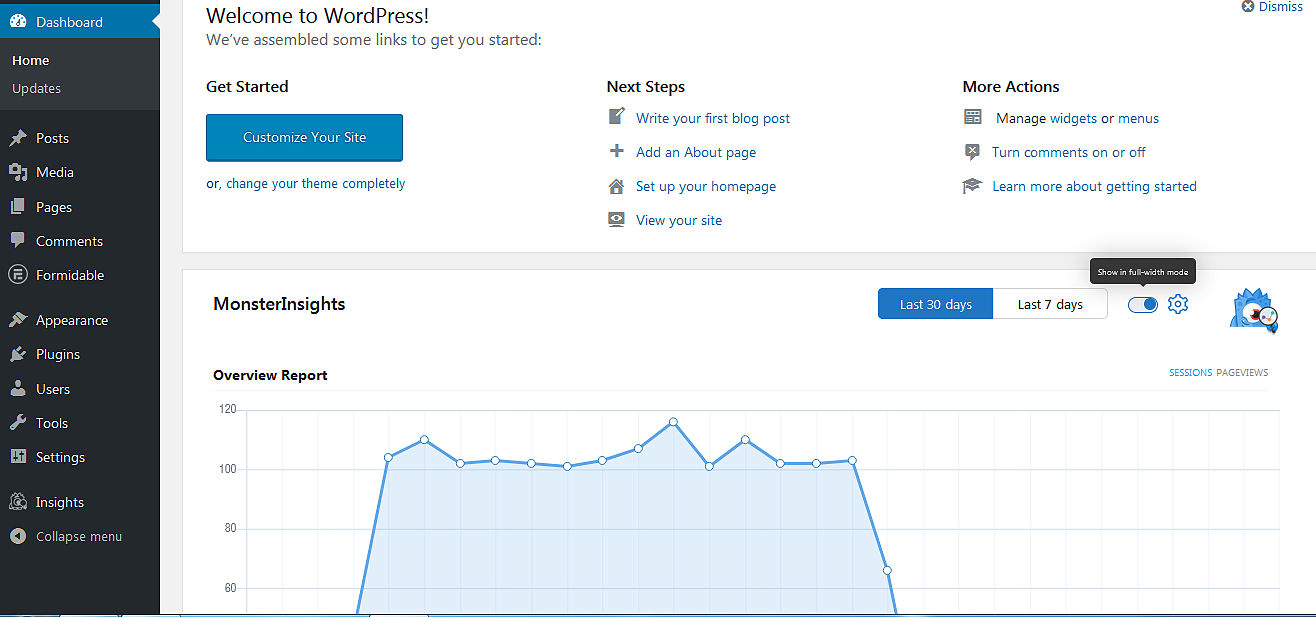
WordPress dashboard home page.

Google Analytics Stats WordPress

Google Analytics account for analyzing your blog stats. Which is not easy for beginners. You should add a code into the WordPress theme’s header for this.

Google Analytics platform bit hard to understand for beginners. You can find every form of information on it, it’s not easy for freshers.

MonsterInsights plugin makes these processes easy. Install MonsterInsights plugin and activate it. If you are new to installing plugin read here for how to install and activate a plugin

Once activated your plugin you will see an Insights menu. Next, you’ll need to connect your site with your Google Analytics account. Read our article about how to Connect MonsterInsights to the Google Analytics platform

WordPress Analytics Dashboard Widget

MonsterInsights give you 2 types of WordPress reporting dashboard widgets:

  • MonsterInsights Dashboard Widget
  • MonsterInsights Custom Dashboards

MonsterInsights Dashboard Widget

MonsterInsights’ Dashboard Widget makes it easy to view your site’s statistics at a glance as you can view them right in your WordPress dashboard. After you log into your WordPress admin area (yoursite.com/wp-admin), you’ll see the dashboard widget.

MonsterInsights’ Dashboard Widget. You can view your site's status at a glance in your WordPress dashboard without going to MonsterInsights’ dashboard.

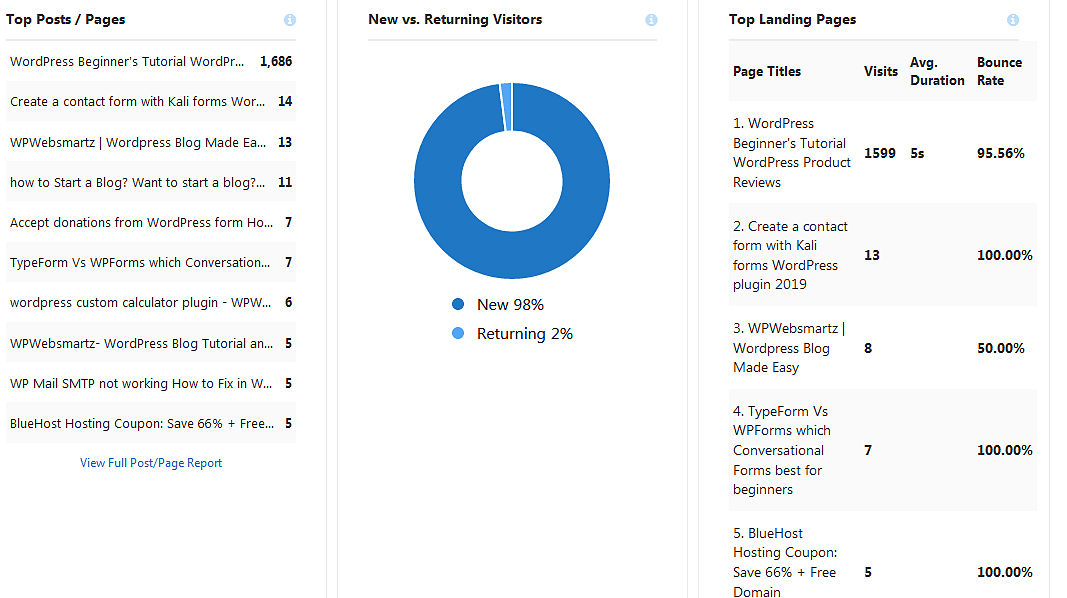
By default, it shows you an overview report. That includes some stats like Sessions, Pageviews, Avg. Session Duration, Bounce Rate. it shows you the last 30 days or 7 days stats.

If you want to add some additional stats to the dashboard. You can add it from the drop-down that includes Publishers report and eCommerce report
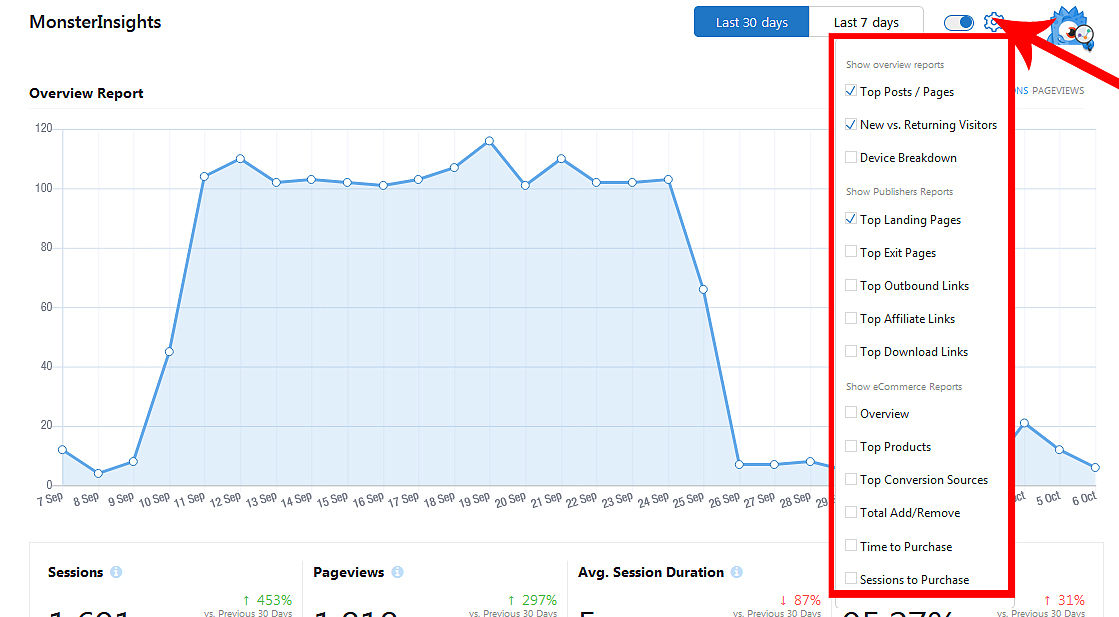
Google Analytics Stats WordPress
  • Top posts / pages
  • New vs Returning Visitors
  • Device Breakdown
  • Top Landing Pages
  • Top Exit Pages
  • Top Outbound Links
  • Top Affiliate Links
  • Top Download Links

Google Analytics Stats WordPress

By default,

2. MonsterInsights’ Custom Dashboards.

Also, MonsterInsights give you custom dashboards inside your WordPress dashboard.

You can view your site's complete stats report in MonsterInsights’ custom dashboards inside the WordPress dashboard.

To view your custom reports go on to Insights » Reports from your WordPress admin area. There you’ll see the Overview report that includes your site’s total page views, sessions, top 10 countries, top referrals, top posts/pages, etc.

MonsterInsights’ custom dashboards include with 7 tabs. That are Overview, Publishers, eCommerce, Search Console, Dimensions, Forms, Real-Time
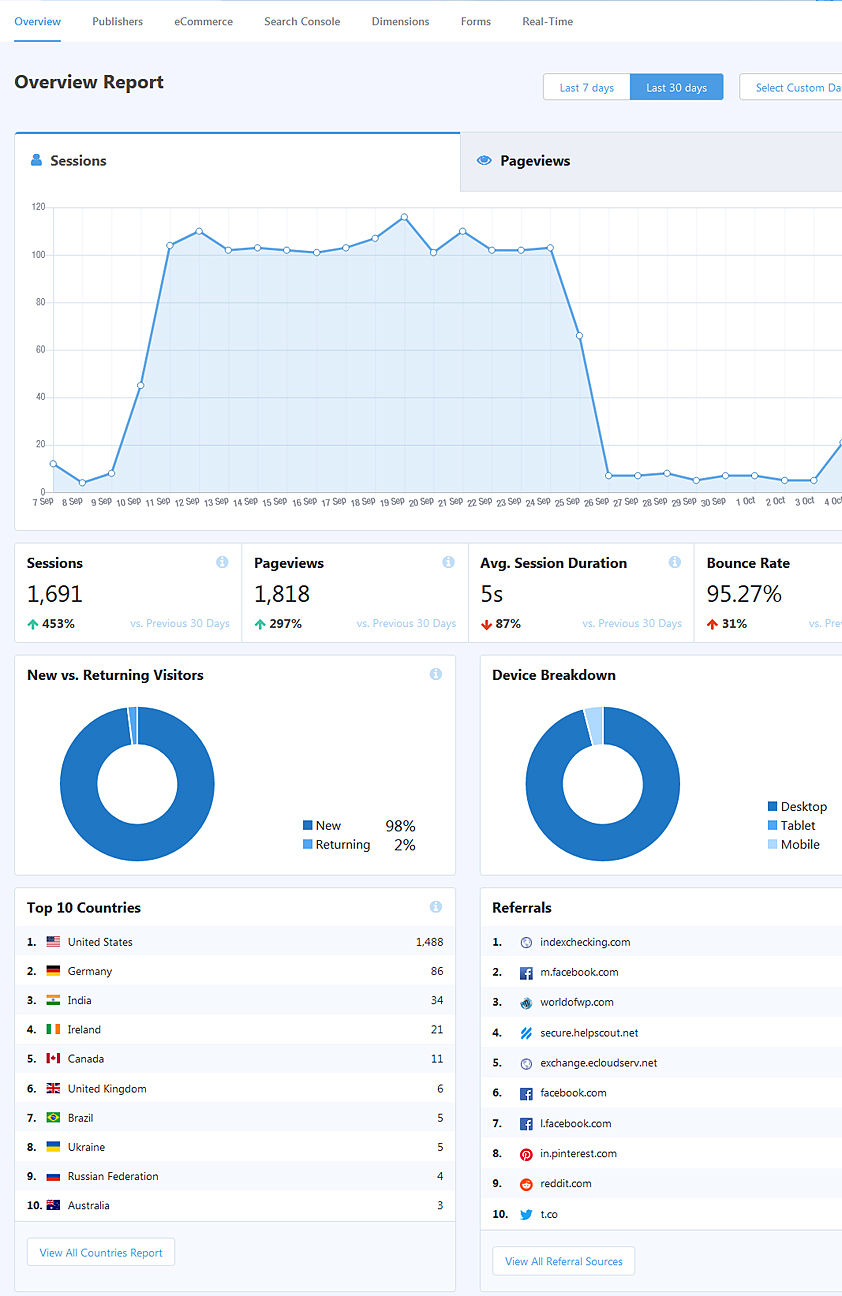
MonsterInsights

Publishers Report

In the Publishers Report tab,

Search Console Report

In the Search Console Report, you can see Top 50 Google Search Terms of last 7 or 30 days or custom date range

Real-Time Report

In the

Buy now Monsterinsights pro

Latest posts

Introducing the Power of AI-Powered GetResponse Email Newsletter:Best Email Marketing Software: A Comprehensive Comparison for Empowering Your Marketing EffortsHow to Make Sure Emails Don't Go to Spam? SMTP Using Amazon SESSend WordPress contact email with WP Mail SMTP ProTop 5 Email Marketing Service Provider for Small Business Marketers

Popular posts

01How to easily set up a Google Analytics Stats Dashboard on WordPress 10 views02How To Easily Set Up Form Conversion Tracking in WordPress (Google Analytics) 0 views03Do You Know Which Keywords People Use To Find Your Website on Google? 0 views04MonsterInsights: Track your Website by Google Analytics inside WordPress Dashboard 0 views

Cricket scores

No cricket matches are available.

Weather

Weather27°
Feels like
30°
Humidity
61%
Wind
12 km/h

Latest e-paper

E-Paper

2026-10-12

Facebook

Instagram

New edition: | 12 Oct 2026 Read now: https://200.wpwebsmartz.com/view.php?id=812 Oct 2026Discover a dedicated solution for digital newspaper management with the WPWebsmartz E-Paper CMS. This content management system is specifically designed for managing and publishing digital e-paper editions. Watch this video to explore the core capabilities of the WPWebsmartz E-Paper CMS for digital publishing and newspaper management. Learn more here: https://license.wpwebsmartz.com/epaper_standalone.php #WPWebsmartz #EPaper #EPaperCMS #DigitalPublishing #CMS #NewspaperCMS https://www.youtube.com/watch?v=vb34qg709OQ07 Oct 2026Discover the WPWebsmartz E paper CMS. Explore the dedicated system designed for managing and publishing your e-paper content online. Click the link to learn more about the features and capabilities of WPWebsmartz E paper CMS today. #WPWebsmartz #Epaper #CMS #DigitalPublishing https://license.wpwebsmartz.com/epaper_standalone.php07 Oct 2026Discover the WPWebsmartz E paper CMS. Explore the dedicated system designed for managing and publishing your e-paper content online. Click the link to learn more about the features and capabilities of WPWebsmartz E paper CMS today. #WPWebsmartz #Epaper #CMS #DigitalPublishing https://license.wpwebsmartz.com/epaper_standalone.php07 Oct 2026Are you looking for fully managed dedicated server hosting? A managed dedicated server is always required to get the best performance for your platform. Check out our full Liquid Web Managed Dedicated Server Hosting review to learn more. #LiquidWeb #DedicatedServer #WebHosting #ManagedHosting #HostingReview https://wpwebsmartz.com/liquidweb-fully-managed-dedicated-server-hosting/03 Oct 2026

YouTube

Add the YouTube URL or content URLs in Settings → Articles.

Featured posts

Top Staff Augmentation Companies in India
How Does WooCommerce Product Gallery Support Self-Hosted and Vimeo Videos?The Role of Server-Level Caching in WordPress PerformanceWhy Your Website Needs a Security Plan, Even If You Don't Handle Payments?Why Colour Choices Matter in Web Design

Horoscope

♈ಮೇಷ♉ವೃಷಭ♊ಮಿಥುನ♋ಕರ್ಕಾಟಕ♌ಸಿಂಹ♍ಕನ್ಯಾ♎ತುಲಾ♏ವೃಶ್ಚಿಕ♐ಧನು♑ಮಕರ♒ಕುಂಭ♓ಮೀನು

E-Paper clips

The latest editions do not contain hotspot clips yet.

Web Stories

8 slidesData-Safe WordPress Hosting with Built-In Backup Support 

Reader Survey

Reader Survey

Register your interest and tell us how to contact you.

Your name
Your email address
Which session will you attend?

Related Stories

How To Easily Set Up Form Conversion Tracking in WordPress (Google Analytics)
Google Analytics

How To Easily Set Up Form Conversion Tracking in WordPress (Google Analytics)

Are looking for form conversion tracking in WordPress, and a google analytics account? This means if you have more user forms on the WordPress websites like contact forms, registration forms, and other types of forms on different locations. And you want to track the performance of all forms. Finally, it will be the for

Do You Know Which Keywords People Use To Find Your Website on Google?
Google Analytics

Do You Know Which Keywords People Use To Find Your Website on Google?

The keyword is a big impact on SEO. Millions of dollars invested in this part of SEO. But still, find a better keyword to our website is a very tough one. We are going to learn how to people discovered your website. Which keyword is lead them to your website. Then you will decide which keyword giving you a good ranking

MonsterInsights: Track your Website by Google Analytics inside WordPress Dashboard
Google Analytics

MonsterInsights: Track your Website by Google Analytics inside WordPress Dashboard

Monsterinsights The best Google Analytics Plugin makes easy your WordPress blog a tracking system. This allows you to track and analyze the blog inside the WordPress dashboard. Every blogger needs a tracking system. Google Analytics ultimate tracking system for any type of blogger. if you are serious about blogging. Yo

Latest NewsLive updates
  • Home
  • E-Paper
  • Web Stories
Logo

© 2025 E-Paper CMS. All rights reserved. | Developed by sunilubar.974@gmail.com

Epaper CMS by WPWebsmartz