
WordPress SEO Made Simple: Semrush Free Trial for 7 days

User Guide of SEMrush SEO Toll Part - 1
SEMrush free trial is best for new websites like freelancers, bloggers, content marketing agencies, small business vendors and so. Because SEMrush gives you a 7 days free trial subscription, you can analyze your website in various parts of SEO.
This article continues to many parts because SEMrush has a bunch of tools and features. We will explain in detail how to use all the tools. So, you can learn how to utilize all tools to your website easily.
SEO for WordPress website and benefits of Semrush Free Trial for 7 days
- Domain overview
- Keyword Research
- Traffic Analytics
- Organic Research
- Keyword Gap
- Backlink Gap
- KEYWORD RESEARCH
- Keyword Overview
- Keyword Magic Tool
- Keyword Manager
- Position Tracking
- Organic Traffic Insights
- LINK BUILDING
- Backlink Analytics
- Backlink Audit
- Link Building Tool
- Bulk Analysis
- ON-PAGE & TECH SEO
- Site Audit
- SEO Content Template
- On Page SEO Checker
- Log File Analyzer
- Listing Management
- RANK TRACKING
- Sensor
- Ranks etc.
Before moving to the origin, Do you have a question on your mind on how to optimize a WordPress site for SEO? or how to learn SEO basics for WordPress? If so, this detailed article about WordPress SEO Made Simple is for you. In this article, we will be explaining to you with images how to do SEO on the SEMrush SEO tool.
What is the SEO
What is the benefits of doing SEO
In the beginning stage of SEO to become an SEO analyzer, or to do SEO for your own website, it can often be difficult to know where to start. Also to hair SEO to your website, it's highly expensive.
If you are a freelancer or unable to invest more in your online business. It's extremely hard to hire a third person for doing SEO. But, every online business must need SEO. Because SEO very important thing to grow the online business to go with the right track.
More importantly, by SEO you can track your competitor's strategies and implement their strategies on your own website.
For more, read our article about Semrush SEO Tool 5 Features
Now let start the proceedings, how set up the SEO basics for WordPress?
To start SEO on SEMrush you should have an account on SEMrush, if you have not, get a semrush free trial for 7 days by clicking the below button.
After creating the account on SEMrush. Take a look over your website's overall performance by entering your domain name on the domain overview.
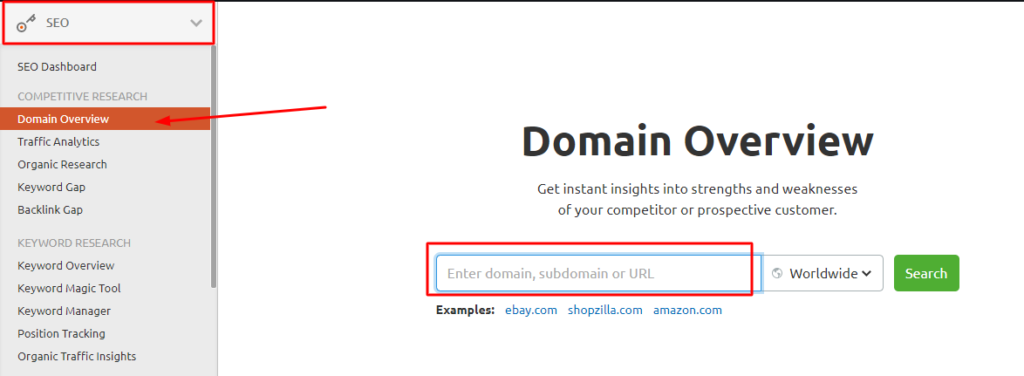
In addition, This is also called domain analysis. By this search bar, you can find any information of any website on a domain in Semrush. once you enter a domain name you can see all the data from the SEMrush database related to that particular domain.
Please keep in mind SEMrush has the 20B keywords in 142 databases in different countries. As result you can view the
First, do Understand and Get the Benefits of domain overview on SEMrush
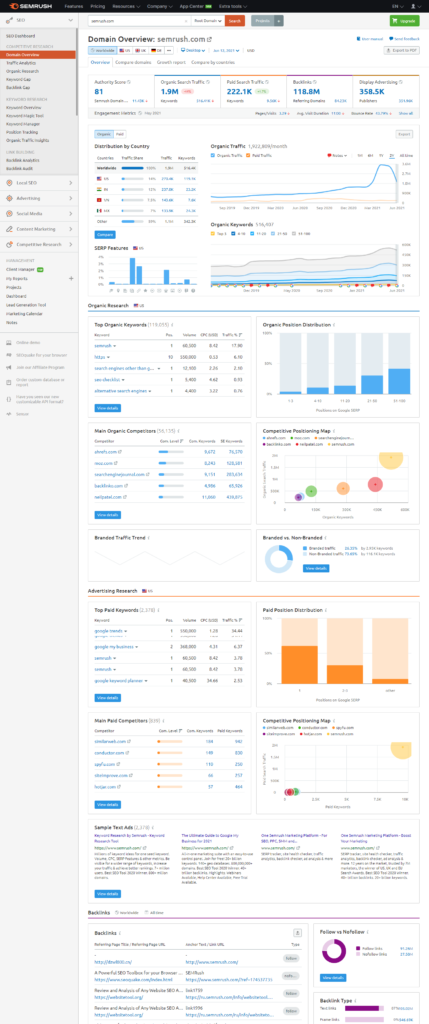
You can take lots of advantage of doing SEO for WordPress websites. First, take a look at the domain overview. In the domain overview, you can see many widgets, here we analyze each widget in detail.
- Authority Score, this score is based on the number of backlinks, referring domains, organic search traffic, of your domain.
- Organic Search Traffic (This will indicates which keywords give you more traffic from search engines)
- List of Top Organic Keywords (This will be the list of top keywords of your website)
- Organic Position Distribution (In this widget you can see how their keywords distributed on Google SERP. This showed you how many keywords get ranked in the top 3 positions, and how many within positions 4-10, 11-20, 21-50, and 51-100.)
- Main Organic Competitors (In this widget you can see the competitors of the domain you have entered. Please keep in mind, this list produced by SEMrush is based on your website niche. These competitors are related to the content of your website. This is the meaning of organic competitors.)
- Competitive Positioning Map (The position of bubbles is based on organic keywords. If any bubble moving up means that it gets more traffic on search engines.
- Paid Search Traffic (In this case this will give you your competitors' bidding information. Which Keywords generate the most paid traffic to a website.)
- Top Paid Keywords (In this widget you can view a list of keywords. These keywords are generating more paid traffic to a domain you have requested.)
- Paid Position Distribution (In this widget you can see which paid keywords distributing more traffic on Google SERP. This showed you how many keywords get ranked in the top 1 position, and how many within positions 2-3, and other.)
- Backlinks (Here you can view the other websites linked to the requested domain. Backlinks have a big role on domain authority)
- Follow vs Nofollow (This is widget shows you the backlink attribution of the queried domain. The follow backlink is give the traffic to a domain. But, the Nofollow backlink does not provide any traffic to the queried domain.)
- Backlink Type ( In this widget you can view the types of backlink to queried domain such as text, image, frame, and form)
- Top Anchors ( In this widget you can see the list of anchor text. The explanation of anchor text is, which words are that would offer more backlinks to a queried domain, those words are called anchor text. Google’s algorithms pay more attention to anchor text.)
- Display Advertising SEMrush has a display advertising crawler this tool shows you the AdSense advertising data from the domain you requested. Here you can research your competitors, and it will help you do the same thing on your website with this information.
Conclusion
SEMrush has a huge tool kit for the SEO-related industry, it offers many types of tools to query on SEO to your website. You can take precise decisions and developments on your website after doing SEO queries on SEMrush.
In addition, SEMrush is famous for its accuracy. It gives you a more accurate result on the query. So, we continue this article into many parts, because it's a long journey, and it's very hard to reach the destination, but not impossible at all.
If you are fresher to this website or the ground of SEO, then, please subscribe to our newsletter for upcoming SEMrush user guide blog posts.
If you want to do SEO yourself, then go through the below link, and take advantage of SEMrush 7 days free trial period.
